Medication reminders for elderly parents, with an alert when a dose is missed
Last reviewed: 20 October 2026 · The Peaflow team
Set up a parent's medications in Peaflow by scanning the bottle and checking every field. Their iPhone or Apple Watch reminds them at each time you confirm, they tap "Taken", and with Plus the care circle gets an alert if a dose isn't confirmed. Peaflow does not give medical advice. Their doctor or pharmacist sets the schedule.
Two phrases on this page need to be exact. "Know they took it" means your parent tapped "Taken": the tap is their own confirmation that they took the dose. "A dose is missed" means the dose was not confirmed in time, and on Plus the care circle is told. Neither one is clinical proof of anything, and neither one says what to do next. Those calls belong to your parent and their doctor or pharmacist.
Why families look for a medication reminder
Medicines are a regular part of later life. In 2021 to 2022, 88.6% of U.S. adults age 65 and older took prescription medication in the past 12 months, according to the National Center for Health Statistics (National Health Statistics Reports number 209, from the National Health Interview Survey of the civilian noninstitutionalized population). That figure is about how many people use prescription medicine. It says nothing about missed doses. The National Institute on Aging puts the trend plainly: "As you age, you may be taking more medications."
Family members are often the ones helping. The Caregiving in the U.S. 2025 report from the National Alliance for Caregiving and AARP found that 63 million American adults provided ongoing care to adults or children with a medical condition or disability. That is almost a quarter of adults, and up 45% since the 2015 survey. Among caregivers of adults, 55% helped by giving medicine, pills, or injections, up from 50% in 2015 (full report, PDF).
A separate federal survey measures something narrower. The Bureau of Labor Statistics reports that in 2023 to 2024, 14% of the civilian noninstitutional population age 15 and over, or 38.2 million people, provided unpaid eldercare. Here, eldercare means unpaid care for someone age 65 or older who needs help because of a condition related to aging. Almost half of those providers (47%) cared for a parent. The two surveys use different definitions and different years, so their numbers can't be added together.
Before choosing any app, check what your parent already uses. In a Pew Research Center survey fielded from 19 May to 5 September 2023, 90% of U.S. adults said they have a smartphone, and adults 65 and older are less likely than younger adults to have one.
How it works for your parent
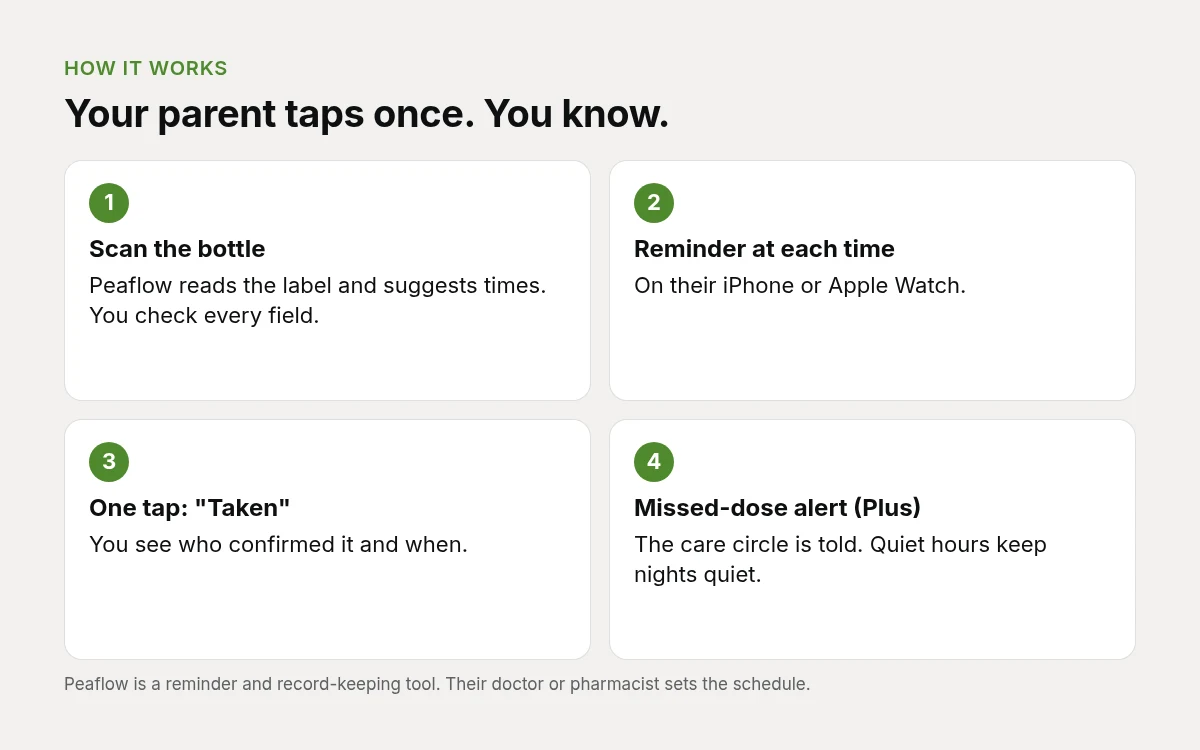
Setup happens on an iPhone. Scan the pharmacy label, and Peaflow reads the name, strength and directions and suggests reminder times. Check every field against the bottle before anything is saved. Then, at each time you confirm, your parent's iPhone or Apple Watch reminds them, and they tap "Taken".
Peaflow doesn't decide how a medicine should be taken. The National Institute on Aging suggests asking the pharmacist what a label's timing means, including whether "four times a day" means during waking hours or around the clock. That is exactly the right question, and the pharmacist is the right person to answer it. For the shorthand on the label itself, see what the abbreviations on a prescription mean.
A reminder app is one memory aid among several. NIA's guide to taking medicines as you age lists meals, charts, calendars, weekly pill boxes, timers, written notes and medication reminder apps as things that can help someone remember. They can be used together.
How it works for you
You set Peaflow up as the owner of the care circle. On the Free plan, the circle is you and your parent (see Peaflow pricing for families). The App Store listing says you see each "Taken" tap as it happens, with who confirmed it and when.
Plus is for families who share the work. You can invite a sibling or another helper, and the listing says everyone sees the same list and the same history. Plus also sends a missed-dose alert to the circle if a dose is not confirmed in time. The alert is a fact about a confirmation. It is not advice, and it doesn't tell anyone what to do. For more on sharing one list across the family, see the caregiver app page.
Long-distance caregiving
The National Institute on Aging says that if you live an hour or more away from a person who needs care, you are a long-distance caregiver. You're not unusual: the Caregiving in the U.S. 2025 report found that more than 10% of caregivers of adults live an hour or more away, while 40% live with the person they care for.
From a distance, NIA notes, a caregiver may order medicines and supplies, keep records, and coordinate with people who live nearby. Peaflow covers one small part of that: the reminder and the record of confirmed doses. It doesn't hire aides, manage money, or make medical decisions.
What it can change is the daily check-in. You don't have to call to ask whether the pills were taken, because you can see whether the dose was confirmed. You can still call to talk.
Quiet hours and not over-alerting
Alerts only help if people leave them switched on. Plus includes quiet hours. In the listing's words: "You can set quiet hours, so nobody is woken for a late evening dose."
Keep the limits in mind as well. Peaflow's medical disclaimer says reminders and alerts depend on phones, networks, notification settings and Apple's services, and can be late or not arrive. A missing alert is not proof that a dose was taken.
Setting it up together
- Scan the pharmacy label on the iPhone.
- Check every field against the bottle.
- Ask the pharmacist for the times, and confirm those times in the app.
- Your parent taps "Taken" on their iPhone or Apple Watch.
- On Plus, choose who is in the care circle and whether quiet hours apply.
There is no step here for what to do if a dose is missed. That depends on the medicine and the person, and it is a question for the pharmacist or doctor.
Free vs Plus
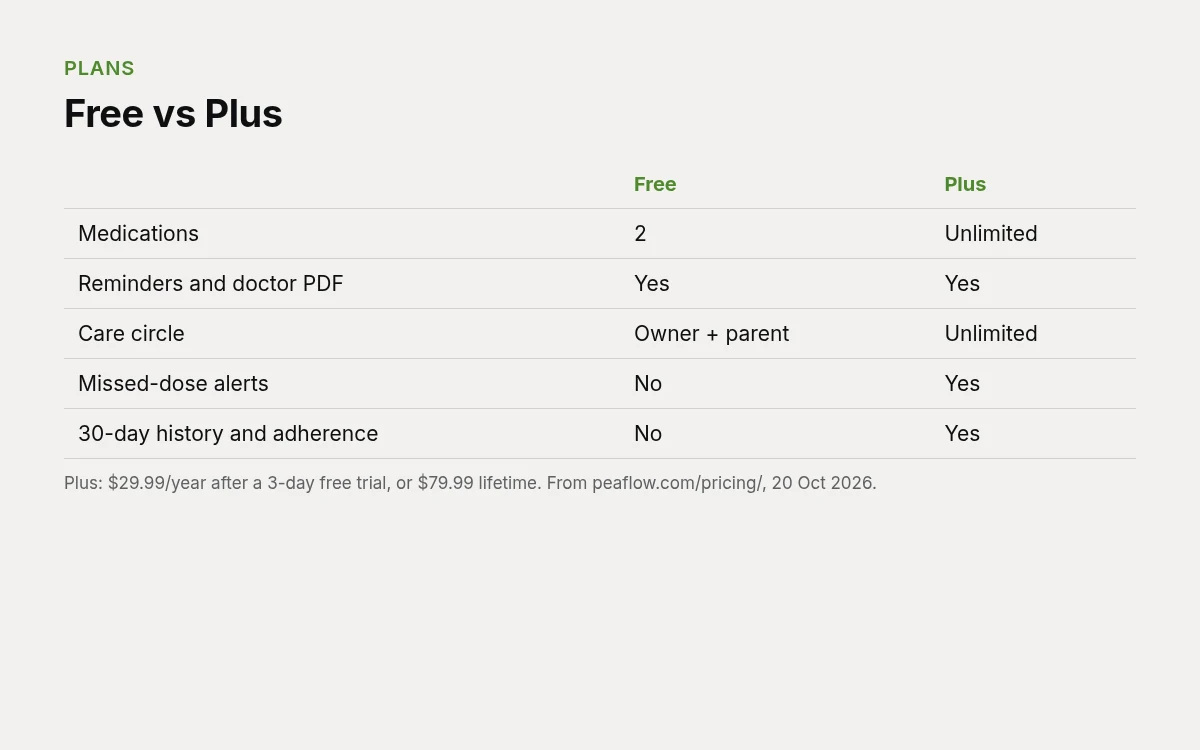
This is the same comparison as on Peaflow pricing for families, checked on 20 October 2026.
| Feature | Free ($0) | Plus ($29.99/year) |
|---|---|---|
| Profiles (you or family) | 1 | Unlimited |
| Medications | 2 | Unlimited |
| Reminders on caregiver and dependent phones | Yes | Yes |
| Dose log and 7-day adherence | Yes | Yes |
| Doctor PDF | Yes | Yes |
| Care circle members | Owner + parent | Unlimited |
| Missed-dose alerts to the circle | No | Yes |
| 30-day adherence and per-medication history | No | Yes |
| Refill reminders | No | Yes |
| Health log (readings and symptoms) | No | Yes |
| Widgets and Live Activity | Yes | Yes |
Free covers two medications and reminders, with a care circle of the owner and the parent. Plus adds missed-dose alerts and more people in the care circle. Plus is $29.99 a year after a 3-day free trial, or $79.99 once.
For more on the reminders themselves, see the pill reminder app page. For the dose log and the doctor PDF, see the medication tracker app page.
Questions about setting up a parent? Peaflow support can help. Or start at Peaflow.
Questions people ask
What's the best medication reminder for elderly parents?
NIA lists more than one tool: a chart, a calendar, a weekly pill box, a timer, or a smartphone reminder app. The times still come from the pharmacist or doctor. Peaflow is an iPhone, iPad and Apple Watch reminder and record. It is not the only option, and it is not medical advice.
Can I get an alert if my mom misses her pills?
On Plus, yes, if a dose is not confirmed in time. The alert says it was not confirmed. It does not say the medicine was skipped, and it does not say what to do. Quiet hours can keep a late evening dose from waking the circle.
Does my parent need an iPhone?
Peaflow is listed for iPhone, iPad and Apple Watch, and it requires iOS 16.4 or later. There is no Android version.
Can several family members share the care?
The Free care circle is the owner and the parent. Plus adds more people. The listing says invited people see the same list and the same history.
Does Peaflow replace a pill organizer?
No. NIA lists weekly pill boxes and reminder apps separately. They can be used together. Peaflow does not dispense pills.