A caregiver app for sharing one medication list
Last reviewed: 23 October 2026 · By the Peaflow team
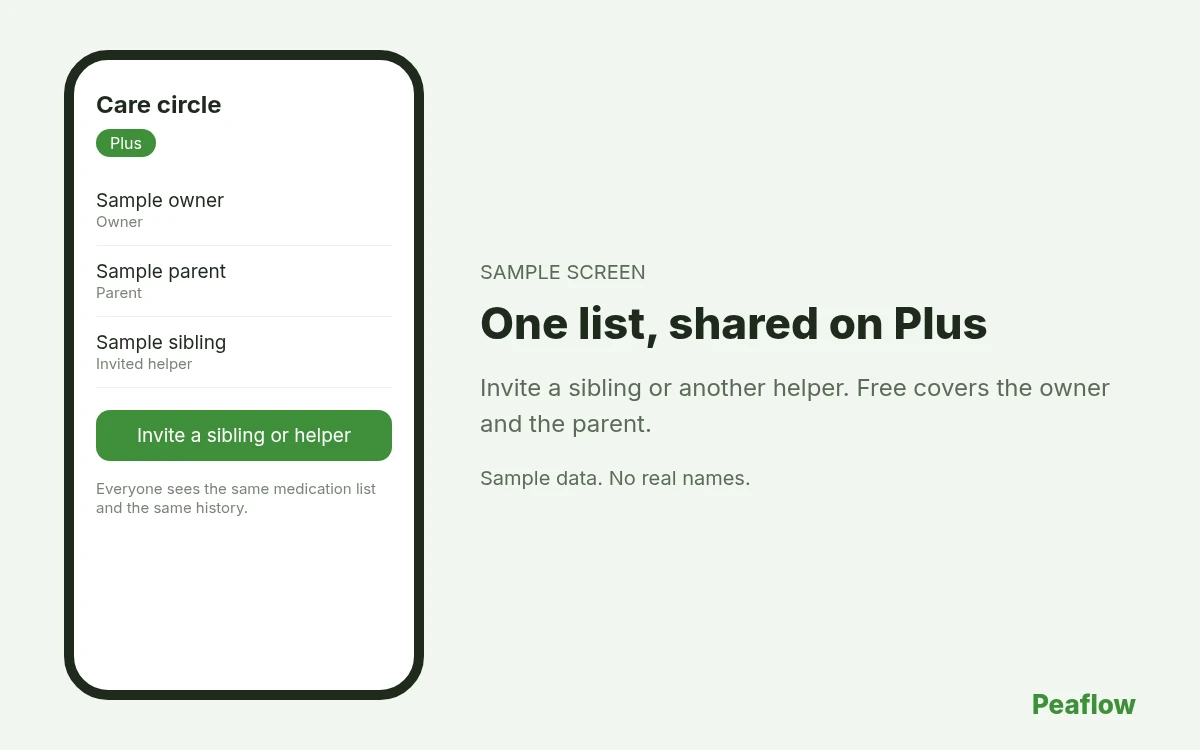
Peaflow is a caregiver app in one sense: on Plus you invite a sibling or another helper, and everyone sees the same medication list and the same history. Free covers the owner and the parent. It reminds and records. It doesn't give medical advice and doesn't track location.
To be clear from the start about what Peaflow is not: Peaflow is a medication reminder and a shared record, not a full care-management suite. It doesn't track location, keep a family calendar, pay bills or hire help. If you need those, you'll need other tools alongside it.
What families are trying to share
If you're sharing the work of looking after a parent, the National Institute on Aging's guide to sharing caregiving responsibilities notes that some smartphone apps can divide duties, keep a calendar and share updates, and that a shared notebook, paper or electronic, can do the job too.
Plenty of people are doing this work. In Unpaid Eldercare in the United States, 2023-2024 Summary (released 25 September 2025), the Bureau of Labor Statistics reports that 14% of the civilian noninstitutional population age 15 and over, or 38.2 million people, provided unpaid eldercare. BLS defines that as unpaid care for someone age 65 or older who needs help because of a condition related to aging. Of those providers, 47% cared for a parent.
The Caregiving in the U.S. 2025 report from the National Alliance for Caregiving and AARP looks at caregivers of adults. In the full report, 40% were caring for a parent, and 55% helped by giving medicine, pills, or injections. The two surveys define caregiving differently, so their figures can't be added together.
Peaflow helps with one piece of that: reminders, and a record of who confirmed each dose.
One list, one history
Inviting more people is a Plus feature. In the App Store listing's words, under "Share the care (Plus)": invite a sibling or another helper, and everyone sees the same list and the same history. On the Free plan, the care circle is the owner and the parent. Plus makes the circle unlimited (see Peaflow pricing).
When your parent taps "Taken", the listing says you see it as it happens, with who confirmed it and when. That tap is your parent's confirmation. It is not proof that a dose was swallowed.
Plus also sends a missed-dose alert to the care circle if a dose isn't confirmed in time, and you can set quiet hours, so nobody is woken for a late evening dose. The alert reports that a dose wasn't confirmed. It doesn't say what to do next; that is a question for the pharmacist or doctor.
For how the reminders work on your parent's side, see medication reminders for elderly parents. For a wider starting point, the caregivers section brings these pages together.
What this caregiver app doesn't do
Peaflow is a medication reminder and a shared record. It is not a full caregiver platform:
- It does not track location, and there is no GPS feature.
- It doesn't keep a family calendar, pay bills or hire aides.
- It doesn't make medical decisions or give dosing advice.
The schedule comes from the pharmacist or doctor. If a label uses shorthand you don't recognize, prescription abbreviations explains the letters. Ask the pharmacist which times to use, then confirm those times in the app.
If you live an hour or more away, the National Institute on Aging considers you a long-distance caregiver. Its long-distance pages cover the wider work, from keeping records to coordinating with people who live nearby. Peaflow handles medication reminders and a shared record, and nothing more.
Free vs Plus
This is the same comparison as on Peaflow pricing, checked on 23 October 2026.
| Feature | Free ($0) | Plus ($29.99/year) |
|---|---|---|
| Profiles (you or family) | 1 | Unlimited |
| Medications | 2 | Unlimited |
| Reminders on caregiver and dependent phones | Yes | Yes |
| Dose log and 7-day adherence | Yes | Yes |
| Doctor PDF | Yes | Yes |
| Care circle members | Owner + parent | Unlimited |
| Missed-dose alerts to the circle | No | Yes |
| 30-day adherence and per-medication history | No | Yes |
| Refill reminders | No | Yes |
| Health log (readings and symptoms) | No | Yes |
| Widgets and Live Activity | Yes | Yes |
Plus is $29.99 a year after a 3-day free trial, or $79.99 once. For a family sharing the care, the rows that matter are the care circle (owner and parent on Free, unlimited on Plus) and missed-dose alerts to the circle (Plus).
The dose log and 7-day adherence row comes from the pricing page; it isn't in the App Store listing.
Questions before you invite anyone? Peaflow support can help. Or start at Peaflow.
Questions people ask
What is a caregiver app?
A caregiver app helps family members share the work of looking after someone. Some divide duties, keep a calendar and share updates. Peaflow covers one part of that: a shared medication list, with reminders and a record of which doses were confirmed. It is not a full care-management suite.
Can I invite a sibling?
Yes, on Plus. You can invite a sibling or another helper, and everyone sees the same medication list and the same history. The Free care circle is the owner and the parent.
Is the caregiver app free?
Partly. Peaflow is free to download, and the Free plan covers two medications, reminders and the one-page doctor PDF, with a care circle of the owner and the parent. Inviting more people is part of Plus, which is $29.99 a year after a 3-day free trial, or $79.99 once.
Does Peaflow track where my parent is?
No. Peaflow does not track location. It reminds at the times you confirm and records who tapped "Taken" and when.
Does Peaflow give medical advice?
No. "peaflow is a reminder and record-keeping tool. It doesn't give medical advice. Always confirm changes with a pharmacist or doctor."